

Holiday drives
Closer to a giving tree than an appeal. People pick an item, buy it, and it arrives at your door.
Most people want to support the work you do. A number on a donation page doesn’t tell them what their money becomes, so they give what feels adequate, or they put it off and never come back.
An item is different. Someone who won’t write a twenty-dollar check because it doesn’t feel like enough will buy a twenty-dollar head covering without hesitating. They can see it. It’s a specific thing for a specific need.
A Giving List turns that instinct into something your patients can use. You decide what goes on the list. Your community fills it.

Built around the moments your community already shows up for. Run one, or run several at once.
Closer to a giving tree than an appeal. People pick an item, buy it, and it arrives at your door.
Build a campaign around the month that matches who you serve, when the attention is already there.
A table, a QR code, a line in the program. Seeing other people give moves more of them than an email.

One list, always open and linked from your website. No deadline, no push, just
You set it up yourself. Less than an hour, start to finish.
1
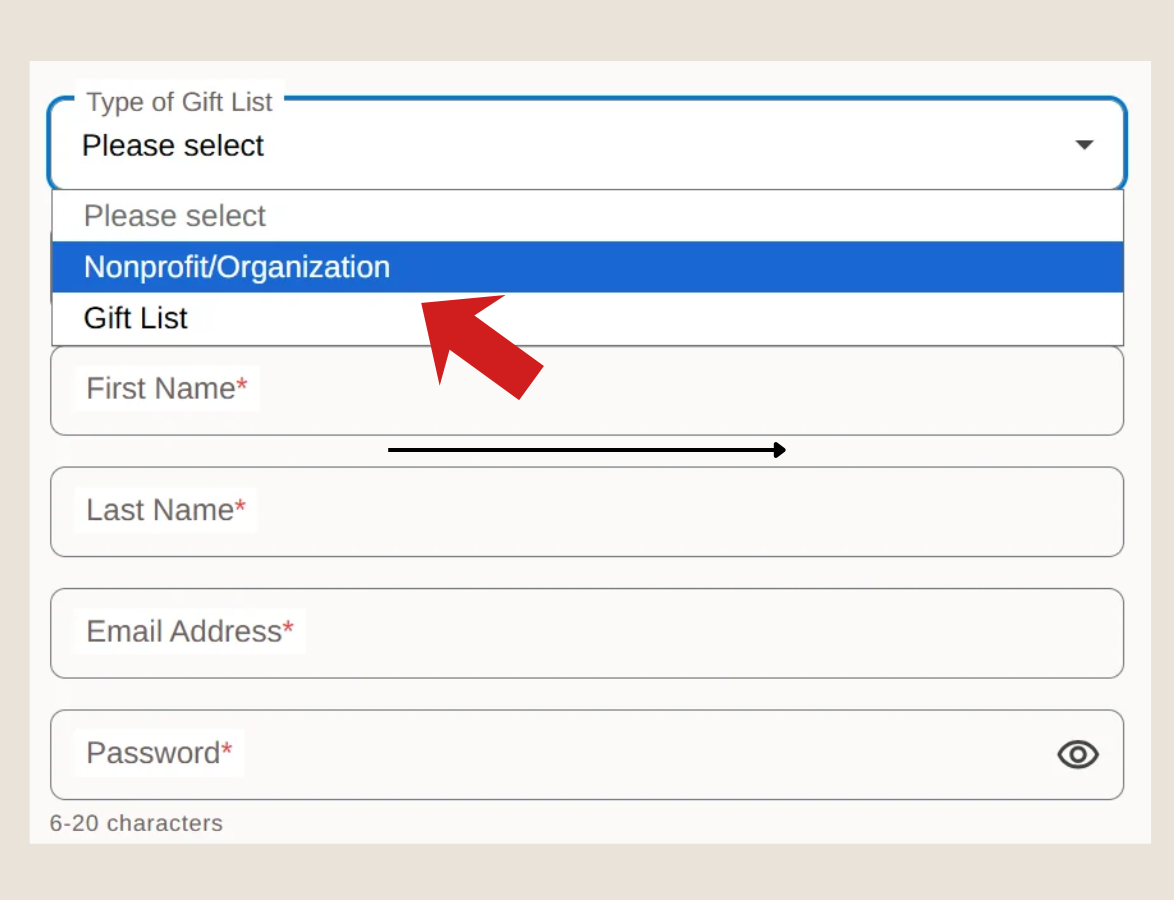
Click "Create a Gift List", then pick Nonprofit/Organization from the dropdown at the top. Now it's an organization list instead of a personal one.
2
Use your foundation’s name or your campaign’s name. That’s what your community sees when you share the link.
3
Browse the Shop at Saltohealth.com and click Add to Registry on what your patients need, then set how many of each.
Browse the shop and click Add to Registry on anything your patients need. Everything on Salto Health was chosen for cancer treatment and recovery.
Give your list some range. A mix of prices means everyone can take part — plenty of what you give out most, and a few specialty items waiting for when someone needs them.


From setting it up to items at your door.
Browse the Shop at saltohealth.com and click Add to Registry.
Email, social media, your website or a QR code at an event.
They know exactly what they’re sending. It's a tangible item going to a real person.
Exactly what you listed, without sourcing any of it yourself.
And you can tell your community exactly what their giving became.
It's free to use. Just choose Nonprofit/Organization when you create it, and name it for your organization. You can create more than one campaign.
Need a hand getting started? Email us at
contact@saltohealth.com
The easiest program you’ll launch this year. No budget needed.

Salto Health may earn a commission on purchases.
After purchase, return to Salto Health and click I purchased this.
Prevent others from purchasing the same item.
Prevent others from purchasing the same item.
This helps the recipient in case of an exchange or return.
User Name
user@email.com


